
 Search
Search
[{{{type}}}] {{{reason}}}
{{/data.error.root_cause}}
{{{_source.title}}} {{#_source.showPrice}} {{{_source.displayPrice}}} {{/_source.showPrice}}
{{#_source.showLink}} {{/_source.showLink}} {{#_source.showDate}}{{{_source.displayDate}}}
{{/_source.showDate}}{{{_source.description}}}
{{#_source.additionalInfo}}{{#_source.additionalFields}} {{#title}} {{{label}}}: {{{title}}} {{/title}} {{/_source.additionalFields}}
{{/_source.additionalInfo}}- Details
- Category: Hardware
-
By Jason Gress
- Hits: 1077
HUANUO TitanLift Heavy-Duty Single Monitor Arm HNSS48

HUANUO TitanLift Heavy-Duty Single Monitor Arm HNSS48
Manufactured by: Huanuo
Release date: 2025
Supports monitors 17”-49”
Up to 40lbs
Supports Dual C-Clamp or Grommet installation
VESA patterns 75x75 and 100x100 supported
Quick Install VESA mounting head
Flat and Curved screen support
19.6" Max Height, 24.8" Max Extension
MSRP: $116.00
(Amazon Affiliate Link)
Thank you HUANUO for sending us this monitor arm to review!
I've long been a true believer in monitor arms for making your desk setup better. I've used various arms from other manufacturers for well over a decade now, and I've always loved the flexibility. While some arms just let you put your monitor in places the included one can't, like higher up, others allow what's called full articulation. In those cases, you can move the monitor to any point and orientation, allowing maximum flexibility. I always opt for fully articulating monitor arms where possible, because I will sometimes move my monitors depending on what I'm doing. And yet, sometimes you can buy the wrong ones, even if you think it's right.
You see, earlier this year, my wife and I redid our desks by staining some butcher block wood planks and attaching them to motorized L-shaped sit/stand desk legs. It's a great setup. However, my old monitor arms were inappropriate for the new setup, so I bought all new arms from Amazon, from the WALI brand. One was heavy duty, and the other lighter, one for each monitor. I was not yet aware of incredible dual-monitor arm stands like HUANUO's DS7, so I bought two single arm stands with weight tolerances and price points appropriate for each monitor. What I didn't realize was that the height I would want my monitor at wouldn't be enough once I switched out my main monitor.
You see, I used to have a main 43" 4K monitor, along with an older 27" 1440p secondary one. The 43" had an intimidating presence, but it's really not a very good gaming monitor since it only has a 60Hz refresh rate and no VRR (variable refresh rate). With that screen, since the front face was so large, the bottom was pretty low. So, the smaller monitor arm on the left 27" screen was high enough that it did the job sitting next to that monster. This fall, we upgraded our main monitors to 40" ultrawide 5k monitors with equally impressive 180Hz refresh rates. Our experience gaming really improved a lot. Once I mounted the big ultrawide on the main larger monitor arm, I realized that my left monitor's arm was no longer good enough because I couldn't raise it high enough to match the main monitor anymore. That's because the new monitors are now much wider than they are tall, and once at the right height, the left smaller monitor was so much lower that it looked silly next to the other. Thankfully, HUANUO reached out about the opportunity to review their monitor stands, and my desk's savior arrived!
This HUANUO TitanLift is a dramatic improvement over the smaller monitor arm I was using before. While this big guy is strong enough to work with either of my monitors, the larger WALI was already installed with a grommet mount, and since I already drilled that hole in my desk, it made more sense to use the TitanLift with my smaller monitor. Yes, this arm is no doubt overkill for my relatively small 27". At least I can say that this monitor is quite old and much bulkier and heavier than modern 27" monitors, so it's not a total waste. Besides, maybe someday I'll replace it with something bigger, and the TitanLift can finally live to its full potential.
When opening the box, it was apparent that this monitor arm has a much different design language than most of them on the market. Instead of a simple black finish and the same arm design you see on arms from many vendors, this has a stylish brownish-gray color that stands out. You can also see inlay tracks for RGB lighting, but I was sent the non-RGB model to review.
Strong Points: VESA head attachment is a great design; dual C-clamp mount is excellent and better than most I've used; adjusting is very easy; nice, long arm
Weak Points: More expensive than some competing products; wire track needs a screwdriver to access; stand base is quite large, which could be a downside for grommet installation; locking slider is hard to lock
The tubing, like the rest of the design, has an interesting futuristic look to it that's pretty nice, and can draw a bit of attention. It's not obnoxious (though the RGB version might be) but it's definitely got character, with its smooth lines and two-tone color scheme. It alternates that black and brownish-gray color on the arms, and the base is mostly the brownish-gray with the HUANUO logo in black. It's a nice look, but more attention-getting than most.
The installation is honestly really simple. The first part is to clamp it to your desk. I did not need grommet installation for this arm, but I'm sure it would work well if you want to do that. I will say that the base is justifiably large for the clamp mount, but it's a bit big if you decide to go the grommet route. I say this because the base is approximately 7" by 5" - that's a lot of desk space. Along the edge that's no big deal, but if you mount it farther in, it could take up significant desk space.
When it comes to the clamp itself, it's a unique design I've never seen before, and I really like it. On most arms, you have a single post and a spinning post which tightens the single clamp. Here, you have an adjustable sliding clamp where you can pick the best thickness for your desk material, and then two clamps with rubber stoppers on them that grip your desk. The two clasps with rubber guarantees that it won't damage your desk, and two helps distribute the pressure from just one spot and offers a kind of redundancy to keep a single clamp from breaking. It may be overkill, perhaps, but as I like to say, overkill is the best kind of kill. (Don't worry, nothing actually died when installing this monitor mount. Other than my ability to make good puns, perhaps.)
Once properly clamped into place, the installation gets even easier from there. First, you place the lower part of the arm into the socket, then tighten it down enough to keep it from coming up easily with the included Allen wrench. Then, you do the same with the upper arm, inserting it into the open socket on the lower arm and tightening the Allen wrench socket on the side. It's important not to overtighten it, or the arms won't swivel easily.
From here is one of the aspects that makes this arm special. The VESA mounting head, or the part that goes onto the monitor, is a separate piece from the arms, unlike some other brands or models. You can easily screw the head plate into the VESA mounting screws on the back of your monitor, and then just lift it and slide it right onto the upper monitor arm. There is a little locking slider that's hard to engage that prevents the monitor from coming off, but honestly even if it's not engaged, you probably won't notice, because there is a rotating pivot past that point, so you can still rotate the monitor completely without concern that it will fall out.
From there, you really only have to make sure everything it tightened, and you might need to tighten the hydraulics on the arm with the included Allen wrench. The nice thing is instead of having to bend the arm a certain way to find the spot to tighten like some of the competition, you thread the included Allen through a calibration hole and twist. It's so easy because no matter how tight you want it, it can never strip! It's a brilliant design. After it's tight enough to hold your monitor up, you're pretty much done. It will keep out of your way from here. It's great!
It's worth noting that when you screw the VESA mounting plate to the back of the monitor, you might need to use the short screws if it's a flat mounting area, or possibly the longer screws with the included standoffs. The short screws are all I needed. If neither work quite right, you can buy any screw of appropriate length at a local hardware store.
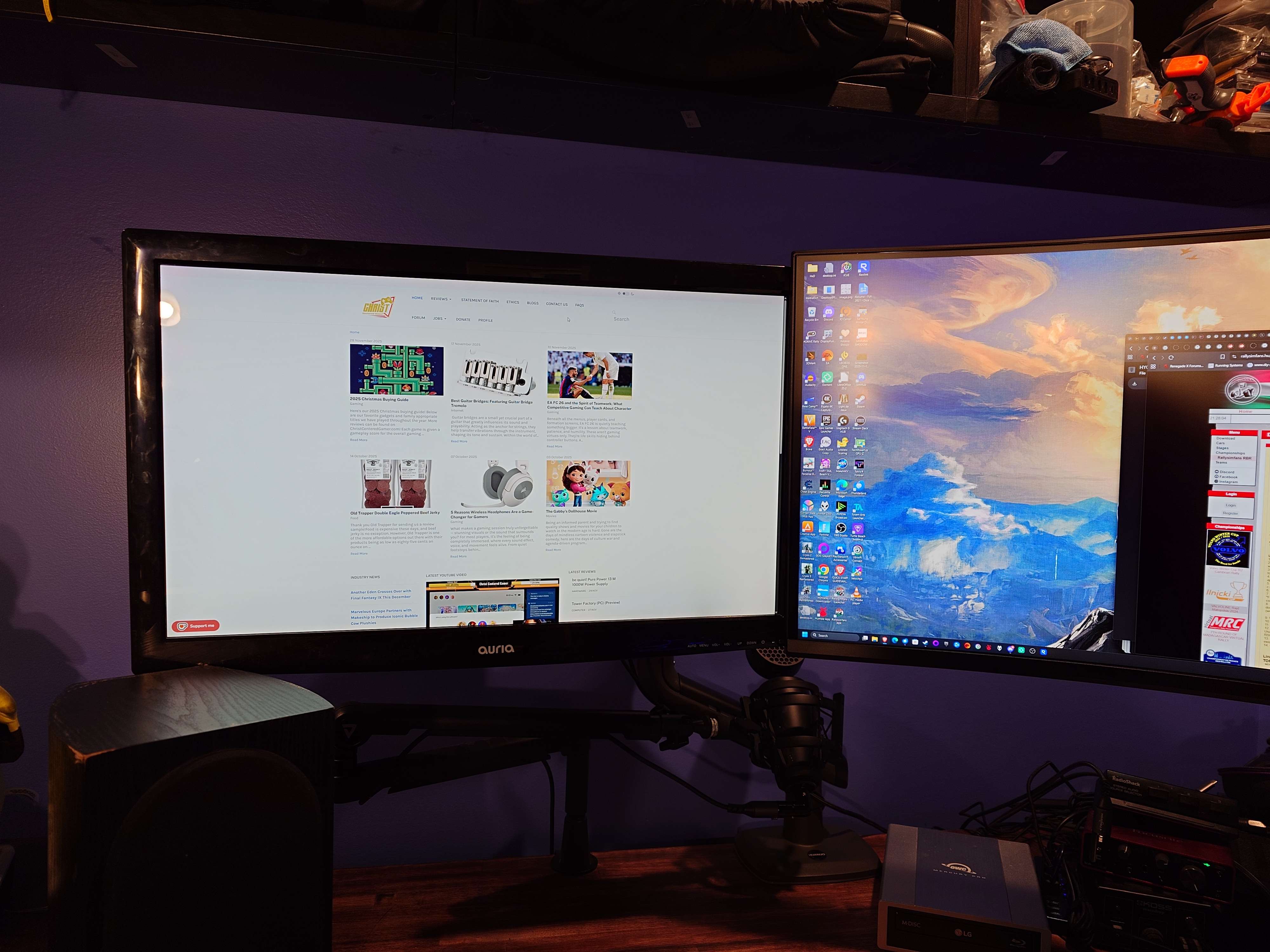
After all of that effort, my desk is now much more usable. With this new TitanLift mount, my second monitor is now high enough off the desk to solve several of my organizational issues all at once! The first thing is I can place the old 27" IPS right next to my big ultrawide and it's lined right up perfectly next to it. This was my main goal. What I also realized is I can now move my desktop speaker farther back, having it more closely match the distance between my ears and the other speaker, because the left speaker doesn't need to be in front of my monitor. Unexpected boons are the best! And the third major issue it solves is that my microphone boom arm has more room under my monitor, so it can swing out without smacking my monitor or anything else on its way out, and I can adjust it without threading that needle. It's great!
Oh, and a fourth unexpected win: I can put a laptop right in front of or under that monitor and I can still see everything. This became really relevant while writing this review, because my desktop GPU started failing, so I sent it back for RMA. I am using my laptop as a backup in the meantime, and being able to put it there and connect it to my screens is a great benefit.
There are also channels to run cables, as many arms offer. I'm really grateful for this, as it's a major benefit for using a monitor arm. I have to note that the lower arm's cable channel requires a Phillips screwdriver in order to lower the tray so you can put wires in there. While that is somewhat inconvenient, I do like that it holds the cables in there very securely, which is quite nice. The top part of the arm has a simpler slide-in mechanism that is tool less, which I appreciate, but that aspect of the design is somewhat dissonant since both halves operate differently. Another small bummer is that this model lacks USB ports, which my other arm has, and I find them quite handy. My wife's HUANUO DS7 kit also has two USB ports, and she loves them, too.
One final thing to note is that the arm's reach is quite good. The smaller model this replaces on my desk is completely outclassed in every way. The other one that's still in service goes higher vertically but not quite as far horizontally. In this case, it's 19.6" vs. 26" vertically; that's a lot, but most people don't need it that high. However, the TitanLift goes 24.8" out horizontally, vs. 21.5". If I'd had this arm instead of the WALI I purchased before, I wonder if I would have still needed to drill that hole in my desk for a grommet installation. I say that because the horizontal distance when edge mounted was close but just a little shy of what I needed. The difference is not far from where I drilled that hole in my desk, which I might have been able to avoid if I'd just bought one of these in the first place. With that said, my wife's HUANUO DS7 has arms that reach out even farther, and higher.
The HUANUO TitanLift Heavy-Duty Single Monitor Arm (model HNSS48) is a great monitor arm that has really solved several issues at my desk. It's a modern design with a unique look and feel, and functions wonderfully. I am quite confident I could put a monitor twice as large on that same arm and it would work great there, too. If there's one downside, it's that the arm is a bit pricey. However, sometimes that price can be justified, if the product is that much better. In this case, I'd say it is. HUANUO's line of monitor arms seem to be really well made and thought out, in ways that went beyond my expectations. Sometimes innovation is with the extra money. Highly Recommended!

You May Also Like
Write for us!

Follow Us on X
Watch our next stream!

Allkeys

Save 2% with code CCGR
Follow Us!





-
Verse of the Day - Joshua 1:9
Have not I commanded you? Be strong and courageous. Do not
...
Donate
Please consider supporting our efforts. Since we're a 501 C3 Non-Profit organization, your donations are tax deductible.
Join Our Discord

Who's Online
We have 22037 guests and no members online