
 Search
Search
[{{{type}}}] {{{reason}}}
{{/data.error.root_cause}}
{{{_source.title}}} {{#_source.showPrice}} {{{_source.displayPrice}}} {{/_source.showPrice}}
{{#_source.showLink}} {{/_source.showLink}} {{#_source.showDate}}{{{_source.displayDate}}}
{{/_source.showDate}}{{{_source.description}}}
{{#_source.additionalInfo}}{{#_source.additionalFields}} {{#title}} {{{label}}}: {{{title}}} {{/title}} {{/_source.additionalFields}}
{{/_source.additionalInfo}}- Details
- Category: Hardware
-
By Jason Gress
- Hits: 1783
Turtle Beach Burst II Pro Wireless Gaming Mouse

Turtle Beach Burst II Pro Wireless Gaming Mouse
Specifications:
Owl-Eye 30k DPI optical sensor, with 70g acceleration and adjustable lift-off distance
Up to 8kHz polling rate (default 1kHz)
Eight fully programmable buttons/actions
Fully customizable with Turtle Beach's Swarm II software
On-board memory - stores button and DPI settings
Titan Switch Optical switches for each button, lasts 100 million clicks
Symmetrical shape
Lightweight, at only 57g
2.4GHz Wireless, as well as Bluetooth wireless connections
High-quality fabric 1.8 meter USB-C connection and charging cable
Includes USB-A to USB-C transmitter adapter
150 hours battery life at 1kHz polling rate, or 40 hours at 8kHz (both via 2.4GHz USB adapter); 165 hours via Bluetooth
Includes extra bottom feet skates, grip tape, and two sets of dome skates
Available in Black or White
MSRP: $139.99
(Amazon Affiliate Link)
Thank you Turtle Beach for sending us this mouse to review!
Turtle Beach's Burst II Air from last year (as of this writing) was my favorite mouse, perhaps ever. It's super light, feels great in the hand, and performs well enough for my needs. While it's not state of the art, it's a lovely mouse all the same. Turtle Beach just released the new Burst II Pro, what is now perhaps their top-of-the-line mouse with several upgrades that really improves it in a lot of key areas - making it in my mind their best mouse yet.
If you look at the old and new mice side by side, they will look all but identical. The Pro has an '8K' emblem on the left mouse button, and there is a strip of chrome behind the mouse buttons. On the bottom there is a '30K Sensor' logo emblazoned on it in purple along with a few other purple accents. Outside of these small changes, the look and feel is identical.
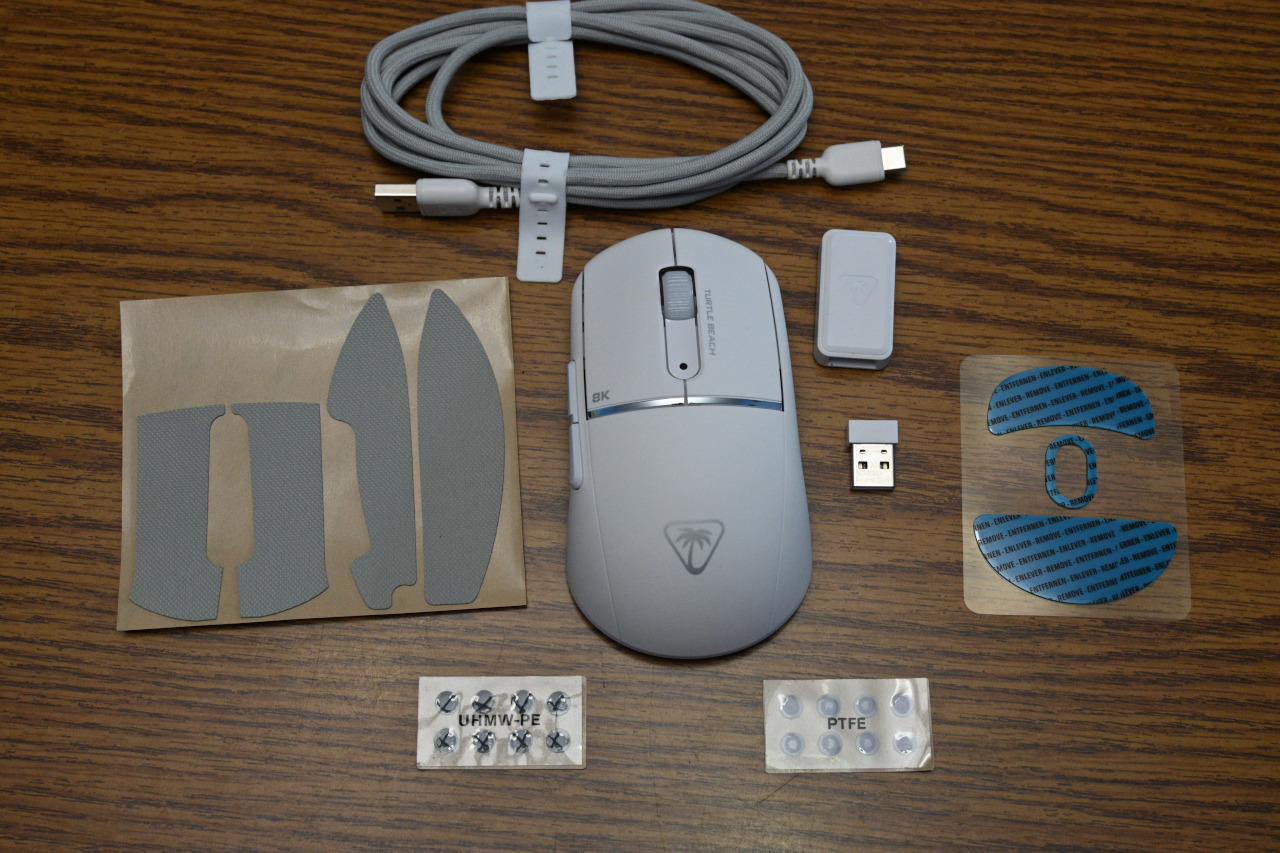
Inside of the box, there is of course the mouse, and the soft and flexible USB-A to USB-C cable. You don't really appreciate how nice of a cable it is until you use one from somewhere else that's stiff and holds its shape. While I expect to use this mouse wirelessly almost all of the time, you can't predict when you might need to charge it, and it's a real shame if the cable adds drag or noticeably pulls at your mouse. These cables are really good in this regard.
Another item included is a full-size set of PTFE (a type of plastic) feet skates that is larger than the set installed on the mouse out of the box. The Burst II Air also included a similar set, but I never bothered to try them. I decided to try them here, and I'm glad I did. The larger feet really do offer less drag on a cloth mouse pad. They also give you two sets of super tiny dot feet. After doing some research, some consider these the best if you have a hard or glass mouse pad rather than cloth like I do. It's nice that they are there, though.
The final piece that's included is some custom-cut grip tape. I loved the tape on the Burst II Air, as I felt like I didn't get enough control with that mouse's crazy-light 47 grams. With this mouse, being 57 grams in weight, it's still really light and one of the lightest I've used, but the tape doesn't feel as necessary for me. I still put it on anyway since I enjoyed it on the older mouse. One difference that surprised me is that I reviewed the black model on the older Burst II Air, and the white model on this Burst II Pro. Surprisingly, there is a small difference between them that I didn't expect: the grip tape rubber used on the black model is softer to the touch than the gray grip tape used on the white model. This lighter tape isn't bad, but I don't like it as much.
Most other physical aspects of the mouse are identical. The Burst II line uses a soft touch type of plastic, rather than the harder and shinier plastics from older models. The Burst series uses a largely symmetrical shape, with a round back and a somewhat wide shape. It's decently long, so you can use it for both palm or claw grip. While the shape is symmetrical, only the left side has thumb buttons, so it's still optimized for right-handed use. Being symmetrical, it doesn't have a rise on the left side of the mouse like many do, making it only usable in the right hand; you can use this mouse in your left hand if you had to, even if a few of the buttons aren't easy to use.
There is a USB-C port in front for connecting to your computer or charging (or both). There is a left and right mouse button along with a scroll wheel; this wheel does not tilt side-to-side like some. Towards the back of the mouse, there is top arch where your palm might go, and it's rounder and flatter than many mice, but is still comfortable to put your hand on. The left side buttons are on the smaller side, but otherwise work well. The DPI (dots per inch, representing how sensitive it is) switcher button is in a unique place on the front left side, near the bottom by the table. My thumb can reach it, but not easily, so I doubt I'll hit it by accident.
Strong Points: Really light; fantastic battery life; works great, especially with grip tape installed; high-end sensor with extreme polling rate support (8kHz); excellent motion and button feel; DPI switcher button is very handy and in a unique spot; USB-A to USB-C transmitter adapter is really handy; nice, soft, and flexible USB-C cable; wireless connection is fast and solid; on-board memory profile; has built-in place to store the wireless dongle; plastic materials feel great and durable; smaller mouse doesn't take up a lot of space
Weak Points: Plastic feel is a matter of taste; white grip tape feels rougher than black; no RGB (not an issue for me); unstable before critical firmware update
The bottom of the mouse has a slider switch to choose between 2.4GHz, Bluetooth, and powering the mouse off. There is also a place to put the USB-A wireless transmitter, which is greatly appreciated. There are two large holes on the bottom to keep the weight down, and there is of course the optical sensor located in the center. That sensor is upgraded from the Burst II Air; a bit more on that later.
At 57 grams (and slightly more with the transmitter or included grip tape on the mouse), this thing is really light. The lightweight mouse market has gotten really competitive in the last year or two, so it's no longer cutting edge, but instead offers an excellent balance between weight, battery life, and other features. A few years earlier this would have been one of the lightest out there; now it's just really good.
As I've gotten older, lighter mice have become more necessary as I unfortunately suffer from RSI (repetitive strain injury). It's one reason I usually play non-FPS games with a gamepad if I can, since it puts less strain on my shoulder. Thankfully, with the rise of really light mice like this one, I can play FPS (first-person shooter) games once again with minimal problems. Outside of me getting old, there are other gameplay reasons for lighter mice, too.
For some, they might like to play shooters with a low sensitivity (usually accomplished using a low DPI setting). A light mouse helps because it reduces arm strain when moving the mouse in large motions across a mousepad or desk. This mouse is light enough that my hands and wrists hurt far less after many hours of work and play. Also, it's easier to make the large mouse movements with less resistance and strain.
When I was first switching to lighter mice, I sometimes found headshots easier with heavier ones because the mouse resistance helped with smoother and more accurate motion. However, with this mouse, I feel like it's in that goldilocks zone where I'm not sure if extra weight would really help me be more accurate.
While the physical design is largely similar to the older model, this mouse represents Turtle Beach catching up to many of their competitors in other ways. For one thing, it has a new Owl-Eye 30K DPI sensor, with excellent 750 IPS (inches per second) tracking speed and 70G (aka gravitational force) acceleration. While 30K DPI is middle of the pack these days, it's certainly competitive in the overall landscape. The main spec to note here isn't DPI, as sensor DPIs have gotten so high as to be largely indistinguishable, but the 750 IPS and 70G ratings are a much bigger deal, putting them well in line with some of the toughest competition. But wait! There's more.
The more I looked into this mouse, the more I realized that they were aiming for feature parity with some of the biggest mice in the eSports gaming space. One feature that is reserved for high end mice is something they call 'Motion Sync'. This feature has the mouse and transmitter perfectly sync up their polling, so that the mouse's poll matches the transmitter's poll to the system. In theory this means the latency is the lowest possible for a given polling rate. If the polling rates of the transmitter and mouse get out of sync, the latency could be either slightly higher or even up to 2x higher depending on where in the cadence the polls mismatched. This feature intends to eliminate that, making performance more consistent.
Another feature that I hadn't heard of before this (though they aren't the first to make it, according to my research) is something called 'Angle Tuning'. The idea here is that many (most?) of us don't move the mouse perfectly straight when moving side to side. Depending on your natural arm angle and mouse grip, you might swipe the mouse with a natural tilt to one side or another. I thought I had a slight rightward tilt, but when I ran the built-in Angle Tune Calibration test, it recommended 0 degrees for me - which is to say I don't benefit from this particular feature. It is neat though, and only the highest-end mice offer it from what my limited research tells me.
Of course the main headline feature of the new mouse is the 8kHz (or '8K') polling rate. Most normal mice use the USB default of 125Hz, or sampling the mouse position 125 times per second (or to put it another way, every 8ms). In the early days of gaming mice, that polling rate started to go up, and after a short while the gaming mouse world settled on 1,000Hz (or 1kHz) as the proper polling rate. Polling every 1ms was quite fast, and really still is. It's only within the last couple of years that have you been able to buy monitors with refresh rates fast enough to to be able to challenge that, with the fastest eSports monitors reaching and exceeding 500Hz. A higher polling rate mouse works in conjunction with a high refresh rate monitor to give you the best responsiveness. Having a high polling rate does steal CPU cycles, but modern CPUs have no trouble with that.
Going above 1kHz, it cuts the time between each poll to .5ms (2kHz), .25ms (4kHz), or even the max this mouse supports, .125ms (8kHz). At 8kHz, this can actually lead to a measurable performance impact in some games, so I probably wouldn't use it all the time; even if CPU usage doesn't matter, battery life might.
This mouse quite honestly has an amazing battery life, especially if you leave it in the default 1kHz polling rate mode. I've used this mouse daily since getting it in for review, and I charged it to full once when I got it. It's been about a week. The charge level is as of this writing at right around 50%! With the older Burst II Air, I would usually charge it 1-2 times per week depending on use. This Pro has almost four times the battery life of that Burst II Air when comparing like for like, with both mice at 1kHz. If you always want maximum performance, you can get about 40 hours at the 8kHz polling rate. That is quite incredible, since you can then set it and forget it to whatever your preferred balance might be. While the mouse is a bit heavier, I'd say that trade-off of battery life is worth it for most users.
With all of that good to say, and for good reason, there is an important thing to note. When I first received this mouse for testing, I was getting random hiccups, and sometimes skips and disconnections for a few moments before reconnecting again. It was random, but quite frustrating. They released several firmware updates to fix it, but it was finally nipped in the bud with the 1.10 firmware update set. It was so bad they actually sent me a black mouse as well, hoping to resolve the issue if it was hardware. It ended up being firmware after all. So, if you decide to buy this mouse soon, make sure that you have a Windows PC available in order to update that firmware right away. After the update, it's been as flawless as any of my other mice.
The Turtle Beach Burst II Pro Wireless Gaming Mouse is honestly one of the best gaming mice I've ever tested. While it had issues at first, they are easily resolved with a firmware update, so please do so when you first receive the mouse. I believe that this mouse is a serious contender for the best mouse of the year for most users. The sensor is excellent, the performance is outstanding, and the comfort is just right, at a light weight that most gamers will love. Just make sure you upgrade your firmware (through Turtle Beach's Swarm II software on Windows) as soon as you get it! This mouse gets my strongest recommendation!

You May Also Like
Write for us!

Follow Us on X
Watch our next stream!

Allkeys
Save 2% with code CCGR
Follow Us!





-
Verse of the Day - Joshua 1:9
Have not I commanded you? Be strong and courageous. Do not
...
Donate
Please consider supporting our efforts. Since we're a 501 C3 Non-Profit organization, your donations are tax deductible.
Join Our Discord

Who's Online
We have 26034 guests and no members online