
 Search
Search
[{{{type}}}] {{{reason}}}
{{/data.error.root_cause}}
{{{_source.title}}} {{#_source.showPrice}} {{{_source.displayPrice}}} {{/_source.showPrice}}
{{#_source.showLink}} {{/_source.showLink}} {{#_source.showDate}}{{{_source.displayDate}}}
{{/_source.showDate}}{{{_source.description}}}
{{#_source.additionalInfo}}{{#_source.additionalFields}} {{#title}} {{{label}}}: {{{title}}} {{/title}} {{/_source.additionalFields}}
{{/_source.additionalInfo}}- Details
- Category: Hardware
-
By Jason Gress
- Hits: 2022
PDP Victrix Pro FS Arcade Fight Stick

PDP Victrix Pro FS Arcade Fight Stick
Mode switch for PS5/PS4/PC
Control bar with touch pad and seven buttons
Tournament mode included
3.5mm headset audio port
Customizable LED colors
Aircraft-grade aluminum frame
Integrated 6.28 degree wrist slope
Built-in foam lap pad
Detachable 3 meter USB-C braided cable
Authentic Sanwa Denshi parts
Detachable shaft with ball top attachment on Sanwa base
Additional Sanwa Denshi Joystick shaft and ball top grip
Dust cap for detachable shaft
Allen wrench
Storage bag
MSRP: $399
(Amazon Affiliate Link)
Thank you Turtle Beach/PDP for sending us this fight stick to review!
With the release of Street Fighter 6 a couple of years ago as well as Tekken 8 and Guilty Gear: Strive, the fighting game continues to be a thriving subgenre. While perhaps not as popular as it once was in the 1990s and early 2000s, it certainly is a lot of fun and has staying power after a resurgence of sorts. Turtle Beach was kind enough to send us out this fight stick for review at our request since I also had a review copy of a major fighting game release. Thanks Turtle Beach!
That game happens to be Street Fighter 6, which was a launch title for the new Nintendo Switch 2. This Victrix Pro FS does not work with Xbox or Switch out of the box, but there are 3rd party adapters that can make it work with both. The Brook Wingman XB2 allows this to work great on Xbox, while I personally bought a Mayflash Magic-NS that allows this fight stick to work great on Nintendo Switch and Switch 2. While neither configuration is officially supported, I can say that they work flawlessly in my testing. I spent more time with this Pro FS using the Mayflash on the Switch 2 than the rest of my testing combined. I did of course test it elsewhere, but most of my time with it was on Street Fighter 6 through that Mayflash adapter.
For those who may be wondering what a fight stick is all about, these are dedicated controllers that replicate the Arcade experience primarily designed around fighting games. This layout includes a joystick on the left and a set of buttons on the right side. While other fighting games are quite popular, like Mortal Kombat and SNK's classics, Street Fighter ended up defining the genre more than any other game series. As a result, the six-button layout of three on top and three on the bottom became a de facto default for many Arcade cabinets, especially DIY ones. More modern games often use the bumpers and triggers, so most fight sticks now use an eight-button layout, with four on top and four on the bottom. This also maps nicely from a gamepad, so most games that use all of the face and top buttons translate easily to the fight stick.
While fight sticks are primarily designed around the needs of fighting game enthusiasts, they are sometimes also used for fans of other classic Arcade genres. This often includes shoot 'em ups and beat 'em ups. For example, I found this to be a great experience when I played Darius with it, as well as classics like Final Fight or Double Dragon. If the game had an Arcade that used a joystick, then chances are it'll work great on fight sticks like this Victrix Pro FS.
Because of the resurgence of fighting and other Arcade-style games, fight sticks have been a popular gaming accessory for over ten years. I got my first fight stick way back in the PS3 era, but it wasn't very good. I got a more modern stick somewhere around ten years ago, with the Hori RAP4. It was a great stick, but it had some flaws, like a start button that's too easy to hit accidentally, and a cable cubby door that broke off easily. That was my main stick until I received this Victrix Pro FS to review, and it's amazing how much better it is (with a few exceptions).
When you first open the box and touch the Pro FS, it's immediately apparent how premium and well-built it is. It's on the heavier side, but that's because the frame is all a single piece of aircraft-grade aluminum. And man, does it feel nice. It's hard to overstate how amazing it looks and feels in person. The Pro FS is expensive, there's no getting around that. But you do get something for that money.
Strong Points: Incredible build quality that can take a beating; about as premium feeling as it gets; very comfortable and ergonomic; works great on supported systems, and even more through third-party adapters; detachable USB-C cable is great; easy to access all parts through a handy door, and easily modifiable; easy to carry with integrated handles and comfortable on lap with integrated padding
Weak Points: Expensive; no dedicated R3 button
I reviewed the white model, but there is an equally stunning purple model available as well. (There used to be a black model that sadly seems to be discontinued. I would have grabbed that one given the option.) The finish is smooth, slightly textured, and cool to the touch. The painted metal frame wraps around as a single piece, with the top and bottom being solid. On the sides it forms an open oval, and there are holes in the bottom that form carry handles. In the center is a plastic box of sorts where the wires and PCB are hidden. Of course there are openings where strictly necessary like where the buttons and stick is mounted.
The top is where the main buttons and stick are. The buttons and stick are all a tasteful black, and are using Sanwa Denshi parts, considered some of the best available by the fighting game community. The stick top can be removed via squeezing and separating it from the base. This is so you can transport it without the stick, well, sticking up. It's a patented design, and it looks and feels great; most wouldn't notice it's two pieces while using it. The box includes an extra stick, a solid Denshi stick if you prefer the feel of a solid post. Removing the stick is really handy for transport, so I kept the default stick installed; it's still nice they include the other if you prefer that. The Sanwa JLK joystick is on the left side, and the eight Sanwa Denshi buttons are on the right.
On the far end of the top surface there is a button strip with seven smaller buttons and a touch pad, similar to what you see on PS4 controllers. The controls are a PS button, Share button, Lighting button, Audio button, the Touch pad/button, the Victrix/Tournament Mode button, Programmable button, and finally the Options button. The Programmable button is labeled 'Pro' and defaults to L3, though with certain button combinations that can change. To the right of the button row is a gray decorative Victrix logo.
On the front there is a form-fitting 3.5mm headset jack, where you can plug in a headset when used in PS4 or PS5 mode. (PC mode disables audio; more on that later.) On the rear, there are two cable organizer brackets, and in the center is a recessed USB-C inlet for connecting a data cable. It comes with a stylish three meter removable cable, though funnily enough my sample had a defective cable; I have another that worked perfectly that I use instead. Gotta love using standard components!
On the bottom of the fight stick, there is a lot of stuff going on. On the left and right side, there is a large oval, meant to be a convenient place to grab a hold of the stick. There are also rubber grip pads on the sides. In the middle is a large door flap with a padded surface with an embedded Victrix logo. This door can be opened with a latch in the bottom center, and all kinds of great stuff that makes this stick special awaits inside.
Inside of the secret compartment are several key pieces. First and foremost, if you want to switch between PS5/PS4/PC modes, you do it with a large purple switch inside this door. It is also from in here that you can easily swap out parts if you wish. Each button has its own wire plug and a simple tab to press if you want to remove them. The Sanwa JLF stick gate can be swapped by pressing four tabs and removing it. If you want to remove the stick entirely, you can do that by removing four screws. Replacing the PCB is a bit more involved, but that's possible, too. Everything is easy to connect, disconnect, and service - and that's clearly by design.
As someone who grew up with fighting games, I did have to get used to the square gates that Japanese fight sticks use. I actually bought an octal gate that more closely mirrors how Arcades were setup when I was a kid, and I used it for a while. What I found was that some moves worked better, while others were worse. I ended up going back to the square gate, but I was able to find a way to fit the one I'm not using in the bottom so I can swap them any time in about thirty seconds if I'm so inclined.
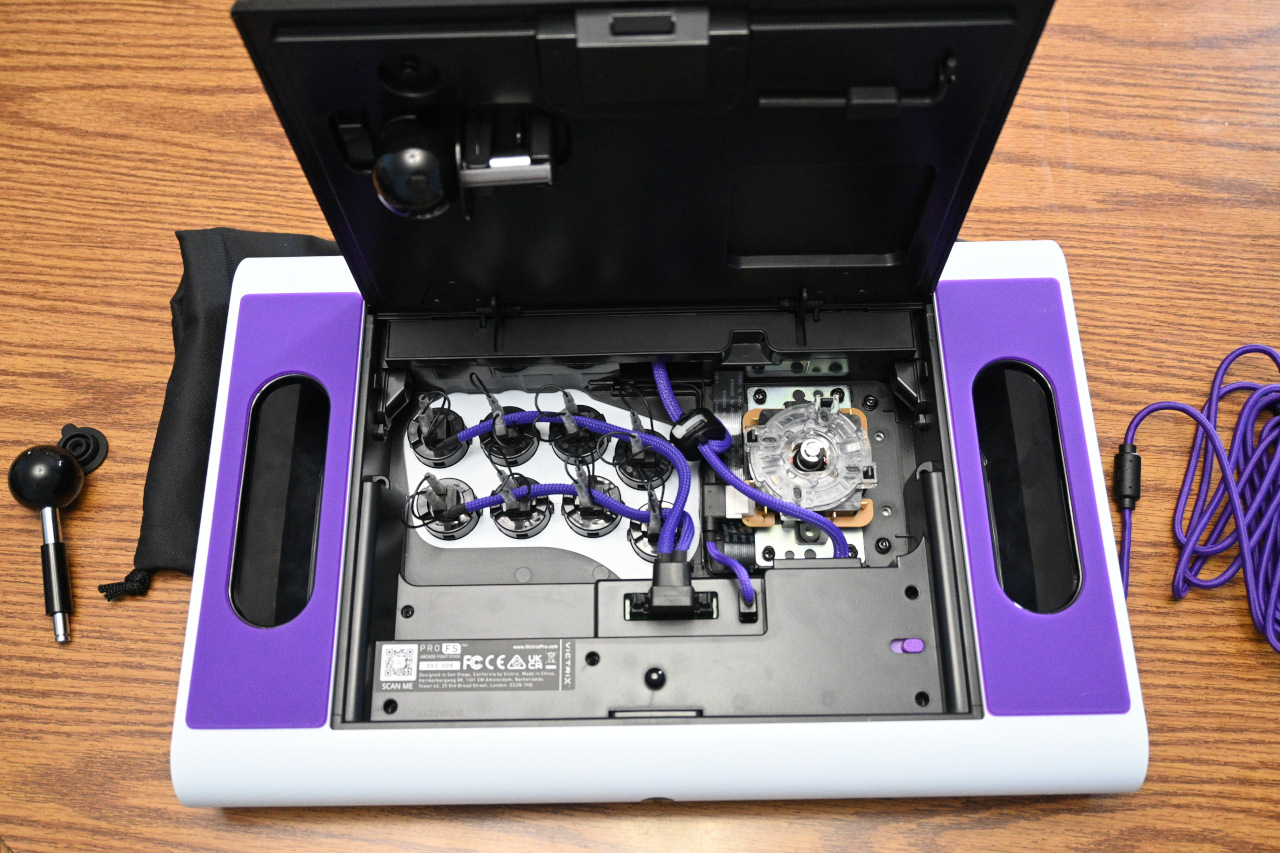
This ability to easily customize anything - the sticks and buttons especially - is a huge selling point on a stick like this. With that said, the default included parts are top of the line and I would expect 99% of gamers to not feel the need to change anything.
Outside of just functionality, the top button row as well as each side has embedded RGB LEDs. You can't customize them too much, but there is a rotation of colors or patterns you can set them to. There are six lighting modes and a bunch of colors. If you hold the Lighting button, you can use the stick to select the color by pressing or holding left and right. You can select one of the six modes by just pressing the button repeatedly to get the one you want. The modes are Fixed, Pulsate, Prismatic, Reactive, White, and Dark.
The button strip's buttons have labels that are only visible when the stick is plugged in and glow in the RGB color selected. It looks great. All of the functionality works as expected, though it does do a bit less than some sticks I've used. For example, there is no dedicated R3 button; the Programmable button defaults to L3, but can be changed. You can change it with a button combination you'll probably need the manual to figure out: press and hold Victrix + Programmable button for three seconds until the lights flash, then press right on the stick. To go back to L3 you press the same two buttons quickly and release. Not exactly intuitive, but it does work. It seems that this is the only way to customize it - no Windows app, like some of their other Victrix products.
Unlike some fight sticks, there is no turbo option or anything like that. On the other hand, this has a Tournament mode (accessed by pressing the Victrix button) that disables everything but the main eight buttons, which is quite handy for real-life competitions. You definitely don't want to accidentally pause a match at a tournament, as that's often instant disqualification. If you want to adjust the volume on the included headphone/headset port, press and hold the Audio button, then push the stick up and down to your desired level. As I mentioned before, only PS4 or PS5 modes support the integrated audio; this stick's PC mode uses the older XInput standard, not GIP used for Xbox gamepads/sticks, so audio features are not available. Thankfully, most PCs can actually use PS4/PS5 sticks just fine, at least via Steam Input, and then the headset port works great.
Speaking of input modes, if you're going to be like me and use this on Xbox or Nintendo Switch via those adapters I mentioned earlier, make sure to have the Victrix Pro FS in either PC or PS4 mode. PS5 mode seems to confuse those adapters, at least on the firmware version I have loaded on mine.
I've spoken a lot about the build quality, and the functionality of this top-of-the-line fight stick. Thankfully, in use, it's just as great as it feels on your lap. The stick feels tight and responsive. The buttons feel bouncy with great reaction. The inputs are reliable and consistent. The many mistakes I made were on me, not the equipment. When I focus on the actual input instead of spamming like I tend to do, it works exactly as expected. I tend to be pretty rough with my fight sticks, and it took my abuse and kept going without issue. I even dropped it once, and it hit a hard wooden floor. It left a tiny mark, and I scrubbed the scuff mark off and now you can't even tell that it was ever dropped. Truly impressive quality and durability!
The ergonomics are also incredible. I used it in front of me on a table, as well as on my lap for many, many hours. The soft touch metals, the bottom padding, and yes, the ergonomic 6.28 degree wrist slope is surprisingly close to perfect. I don't know how they did it, but they made a fight stick that is nothing short of a joy to use.
The PDP Victrix Pro FS is one of the most premium fight sticks on the market for those who demand the best. Of course I haven't used every fight stick; far from it. But my research suggests that if you want something that looks and feels premium, then you can't do much better, and my experience mirrors this. If you want the best, you sometimes have to pay the price. Other fight sticks offer similar hardware, like Sanwa sticks and buttons. Some even offer more features, like turbo modes and such. But what this offers is something you can't replace: a look and feel that is just a step above. There are certainly better values out there. But if you want the best of the best, then look no further than this Victrix Pro FS. As they say, sometimes it's best to buy once and cry once. Highly Recommended if you want the most premium fight stick available!

You May Also Like
Write for us!

Follow Us on X
Watch our next stream!

Allkeys
Save 2% with code CCGR
Follow Us!





-
Verse of the Day - Joshua 1:9
Have not I commanded you? Be strong and courageous. Do not
...
Donate
Please consider supporting our efforts. Since we're a 501 C3 Non-Profit organization, your donations are tax deductible.
Join Our Discord

Who's Online
We have 28401 guests and no members online