
 Search
Search
[{{{type}}}] {{{reason}}}
{{/data.error.root_cause}}
{{{_source.title}}} {{#_source.showPrice}} {{{_source.displayPrice}}} {{/_source.showPrice}}
{{#_source.showLink}} {{/_source.showLink}} {{#_source.showDate}}{{{_source.displayDate}}}
{{/_source.showDate}}{{{_source.description}}}
{{#_source.additionalInfo}}{{#_source.additionalFields}} {{#title}} {{{label}}}: {{{title}}} {{/title}} {{/_source.additionalFields}}
{{/_source.additionalInfo}}- Details
- Category: Hardware
-
By Jason Gress
- Hits: 946
RoboUP TM01 T1200 Pro Robot Lawn Mower
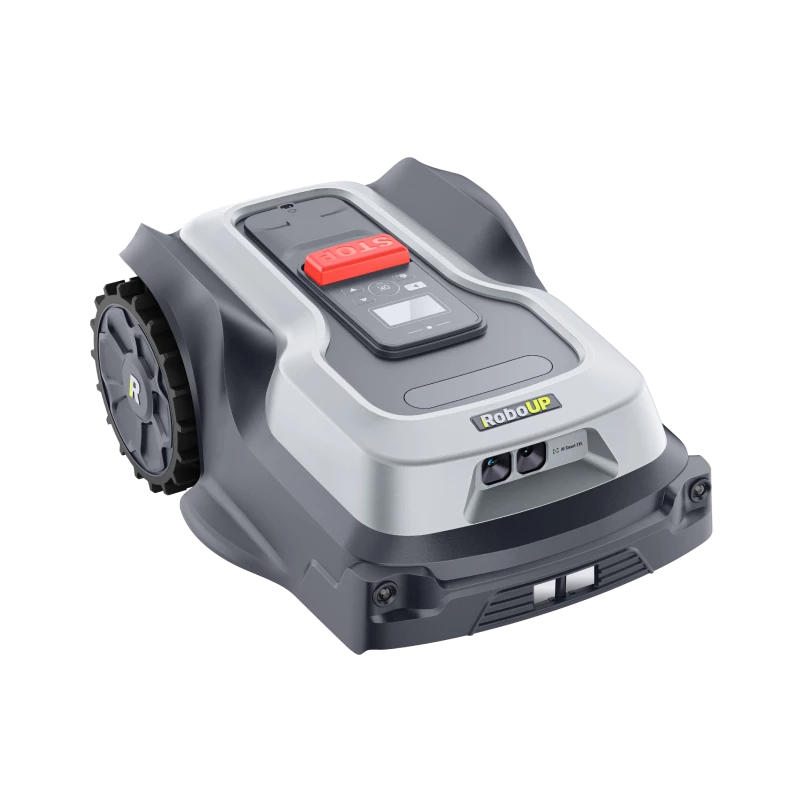
RoboUP TM01 T1200 Pro Robot Lawn Mower
Wire-free robotic lawn mower
Powered by 5Ah battery and charging station
RTK + Vision for positional mapping
AI cameras for obstacle and creature avoidance
Headlights for nighttime operation (can be disabled)
IPX6 Water resistant
Rain detection (optional)
Lawn size up to 1200 m^2
Unlimited number of lawns
Scheduled mowing
MSRP: $1,549.00
(Amazon Affiliate Link)
Thank you RoboUP for sending us this T1200 Pro Robot Lawn Mower to review!
During the wild times of 2020 and 2021, we ended up moving to a more remote house on five acres of land. We love our home, as we have chickens, ducks, bees, and more. However, I have to say mowing so much grass is no simple task, not to mention expensive. We decided to leave a couple of acres as wildflowers for the bees, but we still mow 2-3 acres. We purchased a $4,500 zero-turn mower, and while it's nice, it's a ton of work and it still takes hours to mow. While I'm glad I bought it, I've had to replace countless belts, spindles, and blades; it's much more maintenance than I anticipated. I had considered a robotic mower instead, but felt that there was no way that they were good enough for our needs, or at least it was a huge gamble. While I was sure they could handle simple yards, I was worried that the limitations would prevent it from making it worthwhile. And yes, there are some limitations, but in many ways this RoboUP T1200 Pro has been quiet remarkable.
Before I get too far into specifics, it might be useful to understand how the RoboUp mower works. The mower itself is a rather simple-looking rectangle, with two large rear wheels. If you look underneath, you'll see two smaller front wheels on a swivel, not unlike a shopping cart. Between them, you'll see a 6" disk with three tiny razor blades attached to it in a triangle. It's crazy to think that it would work, but somehow spinning that small disk quickly and having tiny razor blades cut the grass does the job!
There is an integrated battery (somewhere), and on top there is an LCD screen, a series of buttons, and an emergency stop button. There is also a rain sensor on top. On the front there is a pair of cameras and a pair of LED headlights. There is also a charging dock port in the front.
Other important parts include the charging dock itself, which the mower can self-park into; a power adapter and some cables; and the RTK antenna, which is extremely important to mount and setup properly. Getting this right is key to get the mower working as expected. RTK signal problems were the largest source of frustration early on in getting this mower to work.
RTK technology (which stands for Real-Time Kinematic) is the magic secret sauce that makes all of this possible. The way it works is it uses GPS (and similar in other countries) satellites along with triangulation to achieve centimeter-level accuracy. In order to get that, it requires a stationary base station and a moving rover (in this case our mower) that can also receive those GPS signals. It then calculates the difference between received signals, and it uses a communication mechanism between the stationary tower and the rover to maintain a running tally of those differences. On top of this, the RoboUP uses vSLAM (visual Simultaneous Location and Mapping) and IMU (Inertial Measurement Units) to make up the difference, especially if RTK drifts in and out of reception. This combination of sensors and measurements allows the mower to accurately map your lawn and track its location in real time.
After opening the box and taking out all of the parts, the main tasks at hand are deciding where to mount the RTK Base Station, and where to place the Charging Station. There are stakes you can use to fix both into the ground. I ended up putting the Charging Station in the corner of my patio, and I fixed my RTK Base Station to my external TV antenna (my house came with a really tall TV antenna not attached to the house). My hope was to increase the possible distance my mower would work by mounting it up 20 feet high; I may have made things easier or harder on myself, I'm not sure. What I do know is that my son willingly climbed up there to help me mount it, and there's no way I'm doing that again, so up there it stays.
At first, my RTK signal was really, really bad. The Base Station usually showed a solid light (meaning it had satellite signal), but the mower rarely agreed. I had a hard time getting it to do much of anything. I was able to get it to mow one lawn zone I created one day, but not the next. I worked with RoboUP Support and, along with trial and error, I learned a few things about what RTK needs to work well.
Strong Points: Mows very cleanly on an even lawn; handles rain without issue; unlimited zones; can cover a much larger area than advertised; charge lasts a long time, over two hours per charge; powerful mapping via the app once you get used to it; quiet; avoids creatures well
Weak Points: Getting RTK signal working well can be a challenge, especially under foliage; small divots or dips can get it stuck; as maps get larger, it stops to think for longer periods; setup can be more involved than it may first appear
First things first, foliage (branches, leaves) are not 'just leaves'. They can and will aggressively block RF signals. I didn't realize this at first, but I had terrible signal until I took a chainsaw to the overgrown mess of bushes that I had around my RTK Base Station. There is probably 70% less 'stuff' there now, and my RTK signal dramatically improved. As an aside, when I mentioned that to my dad (who was an RF engineer installing cellphone cell sites in the early days) told me a story where they installed a cellphone tower in a forest in the fall, and in spring all nearby customers lost signal. That's why all cell towers are now installed in clearings.
The other issue I ran into was that I put the Charging Station too close to the house, near my metal-roofed canopy. This meant that it really only had sky visibility for a little over a quarter of the space above it. While I couldn't move it to a fully open area like RoboUp Support asked of me for logistical reasons, I did move it forward and gained dramatically more access to the sky. After making those changes, I only have occasional issues with RTK connectivity in the early evening; any other time it works just fine.
I also found that after a firmware update (there have been two since I got it in), there seems to have been some change in how rotational detection works. If the RTK signal is too weak, I've noticed that sometimes the mower can be detected as being off by 90 degrees. In other words, the control app will think the mower is facing right, while the mower physically is straight. Clearing brush and improving RTK signal quality largely resolves this, but I didn't know it at the time. RoboUP Support really helped me work through these issues.
Speaking of apps, the RoboUp line of mowers requires a mobile app to function at all. I use Android, so I used that app, but there is also an iOS app for those so equipped. If you don't have either, expect to deal with Android emulators and such, as there is no other way to control this RoboUP mower.
Once you download the app, you first create an account, then register your mower with your account. It then has you connect to the mower via Bluetooth, and then also connect it to your WiFi access point. Use a 2.4GHz access point, because range is far more important than speed in this case. You will also need to make sure that your mower is docked in the charger; I'd recommend topping it off before using it, which thankfully is pretty quick: even from only 20% full, it fully charges in just over an hour.
From here is where things get interesting. You need to map out your lawn. If you have a simple, fully-enclosed lawn with fencing around it, then you can just put it in Auto mode and let it go! If yours is like mine and you have an open field with no fences bordering your neighbors, then you will need to use manually-created lawn maps that the mower will then follow. This process is more involved but can lead to great results.
To create a manual map is easy the first time (it asks you if you want to create a manual map or auto the first time), but it took me a bit to figure out how to add a second (or more). What you do is click the map with pencil icon to edit the map, and there are four icons on the bottom of the the screen. These icons each add something new. The first is 'Boundary', which you use to create a new Lawn. Next is a 'No-Go Zone', which I found to be really important (more on that later). The next is 'To-Go Zone', which is essentially a passthrough area that can be mowed (like a stone path). The last is a 'Passage', which is something like a sidewalk or other passage where the mower can cross but not cut.
Once you decide what kind of zone you want to create, then the mower goes into a really neat remote-controlled mode where you are given two sets of controls: a forward/backward slider, and a left/right slider. To make a boundary, you essentially 'walk it' around, drawing the line defining an enclosed shape of pretty much any type and size you might need. You can use two types of 'lines': an 'edge' boundary, and a 'center' boundary. The former is the default, and works as expected most of the time. The center boundary is useful if you want the mower to ride on the edge of another surface, like a patio, and mow past the boundary a bit to get everything. I found this very useful when I noticed the default line would leave a strip of grass right next to my patio otherwise.
Once a Lawn is defined in the app, you can rename it if you wish. If there's nothing to worry about inside of that zone, you can click on it and tell it to mow and off it will go. In my case, I discovered that one of my low-hanging pine trees would get the mower stuck underneath it as there are weeds and other brush I really should clean up under there. (Sounds like another job for that chainsaw!) In the meantime, I created a No-Go Zone in there, and sure enough it avoids that area now. This really saved me a lot of headache, as this area kept being a trap for the mower, since it's right in the way between my Lawn 6/7 and the Charging Base.
Speaking of getting stuck, I also noticed that my (sweet but dumb) dogs would sometimes dig little pits right around my huge 200-year old Oaks. The mower would go along like nothing was wrong, then get stuck inside of these shallow pits that my dogs would leave. As frustrating as that is, I need to map some No-Go Zones around there, too.
Sometimes Lawns will be separated by gaps or other areas like driveways and patios. If the mower can't get to a lawn, it may ask you (or force you) to create a passage to get there. It's sometimes confusing, but it does usually work if you make it happy.
One thing I noticed is that if your new Lawn is too far outside of the range of your WiFi, or if you draw the boundary but your phone can't access WiFi, it might not let save when you hit 'Complete', but just sit there. In order for it to 'take', you might need to take your phone and possibly the mower as well to within WiFi range. Then, when you hit complete, the prompt will go away after a moment. It's quirky and could be more refined, but it does work. One thing about this mower is that I've learned that you can try to make it do things that seem well outside of what it should and it'll usually at least try to let
Despite that, there are a few limitations to keep in mind. The main one (for me and my large tract of land) is that you really don't want to go much above 1,400 square meters. (The app does let you choose your unit, but it defaulted to square meters and I left it. Square feet is also available.) You may even want to stick to under 1,200 per Lawn. You can create as many Lawns as you like, so strict logical divisions make sense. If I had this mower with my old house, I would have probably made a front and back yard preset and left it at that. In my case, I made eight Lawns and probably need to make a few more to completely handle my large coverage area. I tried making a massive 2,200 square meter Lawn, and it let me - but the mower actually locked up and required careful intervention to recover: I powered of off, turned it on, quickly pressed the emergency stop button, then deleted the map. I remade a new one that's closer to 1,600 square meters and it worked, but I have to admit that it's a little flaky sometimes when working on that map.
In my experience, the smaller the map, the more responsive and quicker the mower acts. For example, with some of my larger maps, it would sometimes bump into something and just sit there and 'think' for quite some time before recovering and moving on again. With smaller maps it doesn't really do this. I have multiple large maps and use them often; just keep in mind that the closer to the 'edge' of its capabilities you get, the more likely you are to have problems. Thankfully, while sometimes a large, distant lawn can take longer to complete, at the end of the day it doesn't matter all that much, as the mower will keep going until you tell it to stop or the job completes.
The mower handles most of my zones quite well, and one of my neighbors enjoys watching it go when I have it by his house. However, that large zone I mentioned before is not only finicky because it's big, but also because it's almost entirely covered by large, beautiful, and very old trees. The view in my back yard is honestly breathtaking during much of the non-winter months, but that canopy of gorgeous, 200-year old oak trees leads to a leafy cover that does a grand job of blocking satellites. I honestly don't know if it's going to be able to handle that area well or not as I haven't found a good set of tweaks yet. I currently have to rescue it from dog pits (I can fix that!) to dealing with random 'RTK Signal Lost' errors on my phone, which can lead to the mower stopping and just sitting there. Thankfully most of the time it gets back signal sooner or later, but if it doesn't pick up a satellite within a half hour, it'll go to sleep and I'll have to go out to the mower, pick it up and bring it to the charger, or manually power it back on if the battery still has juice left in it.
Thankfully, the battery life is actually pretty awesome. It's rated for 'over 100 minutes' of battery life, but sometimes I'll see it get over two hours. It also charges to full in just over an hour. It's a pretty great runtime ratio, so a lot can get done in a day if there are no errors or other problems.
The RoboUp TM01 T1200 Pro Robot Lawn Mower is not a perfect robo mower by any means, but it does a whole lot right. I was able to stress test it to handle far more than it really should be able to, and outside of the mostly covered zone, it works really, really well. Because of my massive amount of land, I can't really take advantage of the scheduling feature too well, but for most 'normal' users, they can program the Lawns, put them on a weekly schedule, and never think about their lawn again except for the occasional need for a string trimmer. For me, I can go from mowing every week to bringing out the big mower once a month to get whatever that little guy can't handle, like really tall grasses, thick weeds, or the far back part of my yard I mostly neglect. After all, a small disk spinning razor blades works great with grass, but nothing thicker or taller. It also can't handle mulching up leaves. Despite the limitations, this little robot has granted me a seriously improved quality of life - and for much less money than a lawn service. I love this thing and strongly recommend it!
At the time of this writing, it's near the end of the mowing season. RoboUP has this T1200Pro model on sale for 40% off on their website! That brings it down to $929.40. At this price, you would be wise to jump on this excellent mower!

Write for us!

Follow Us on X
Watch our next stream!

Allkeys

Save 2% with code CCGR
Follow Us!





-
Verse of the Day - Joshua 1:9
Have not I commanded you? Be strong and courageous. Do not
...
Donate
Please consider supporting our efforts. Since we're a 501 C3 Non-Profit organization, your donations are tax deductible.
Join Our Discord

Who's Online
We have 29683 guests and no members online