
 Search
Search
[{{{type}}}] {{{reason}}}
{{/data.error.root_cause}}
{{{_source.title}}} {{#_source.showPrice}} {{{_source.displayPrice}}} {{/_source.showPrice}}
{{#_source.showLink}} {{/_source.showLink}} {{#_source.showDate}}{{{_source.displayDate}}}
{{/_source.showDate}}{{{_source.description}}}
{{#_source.additionalInfo}}{{#_source.additionalFields}} {{#title}} {{{label}}}: {{{title}}} {{/title}} {{/_source.additionalFields}}
{{/_source.additionalInfo}}- Details
- Category: Hardware
-
By Cheryl Gress
- Hits: 381
Epomaker HE68 Lite Keyboard

Epomaker HE68 Lite Keyboard
Epomaker HE68 Lite Keyboard
Manufactured by: EPOMAKER
Released: June 23, 2025
Specifications:
PBT Keycaps
Hall Effect Switches
125Hz-8KHz Adjustable Polling Rate
0.1mm-3.4mm Adjustable Actuation
0.125ms Latency due to 128K scan rate
MSRP: $49.00
(Amazon Affiliate Link)
Thank you Epomaker for sending us a review sample!
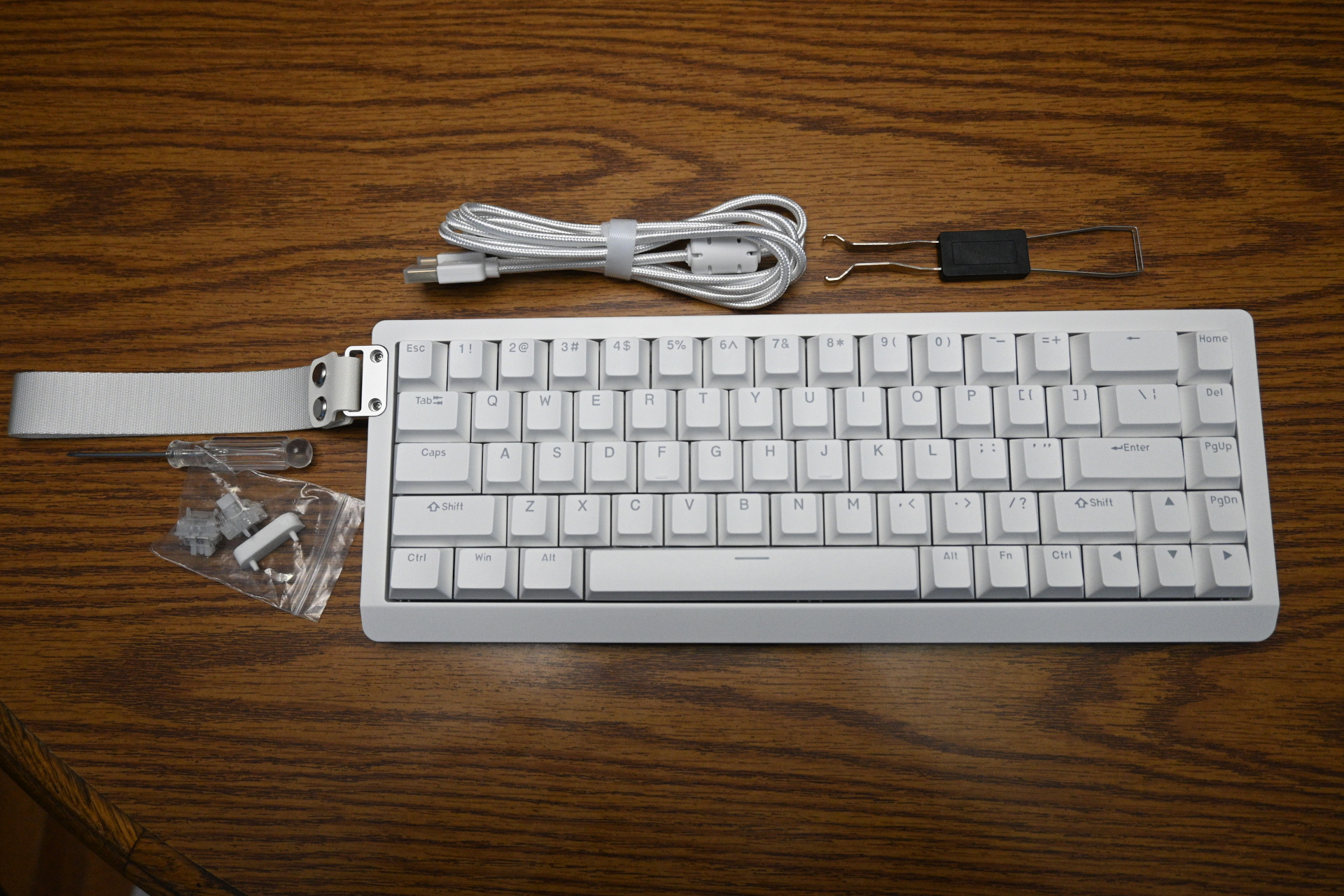
Epomaker (Epoch of Makers) was founded in 2019. Their specialty is budget-friendly mechanical keyboards. The HE68 Lite keyboard is the second Epomaker keyboard I have used. I was gifted a customized Epomaker X Leobog Hi86, and despite reviewing many keyboards, this one quickly became my favorite after swapping out the keycaps to better illuminate the lettering. Sadly, I stopped using it after a few of the switches stopped functioning properly and I ran out of rarely-used to keys to swap them out with. I’m happy to report that the Epomaker HE68 Lite Keyboard feels just as amazing, has shine through keycaps, and more reliable hall effect switches. All this for under $49.99!
I generally prefer fuller keyboards with a number pad, volume knob, and a print screen button. The Epomaker HE68 Lite keyboard doesn’t have any of those features I am spoiled by. I am making due without the number pad, though I could buy an external one if necessary. Using the Epomaker software, I found the keyboard short cut for print screen (FN+Y). The driver software lets you create macros, keyboard shortcuts, and configure the LED color and illumination settings. Epomaker warns that macro usage could be breaking rules in competitive gaming!
Like many gaming keyboards, the Epomaker HE68 Lite offers many RGB lighting options. Many of the light effects use rainbow coloring by default, but you can often select your favorite color if desired. Here’s a list of available lighting effects: Wave, Ripple, Starlight, Stream, Shadow, Mountain Wave, Sine Wave, Color Spring, Snow Trace, Flower Wave, Kill two Birds, Circle Wave, Colorful Cross, Snow Fall, Meteor, Always On, Dynamic Breathing, Spectrum Cycle, Custom, and Music Follow. Most of the animations only activate after you press a key. Since I often work in a dimly lit office, I prefer a lighting mode like Dynamic Breathing or Colorful Cross that illuminates the keys the majority of the time.
Strong Points: Featured-packed keyboard for a low price; very compact with lots of software options to emulate the missing keys
Weak Points: Not a fan of the side strap; I miss features like the number pad, volume knob, and print screen button
Hall effect switches are magnetic and use sensors to detect keyboard presses. By using magnetic sensors instead of physical metal contacts, they eliminate wear-and-tear, chatter, and oxidation. Hall effect switches are known for their reliability, and I look forward to not having to swap them out anytime soon. The hall effect switches feel and sound amazing when typing with them. One downside to hall effect switches is that they require a wired connection due to power consumption requirements.
The software is integral for learning all of the FN functions. Many of the functions are logical like the FN+ number key being equivalent to F#. The other default FN shortcuts will need to be learned or reprogrammed. The default settings are FN+Y is print screen, FN + U is scroll lock, FN + I is pause, FN + O is end, and FN + P is insert. There are no default media keys assigned, but you can add your own.
With the software, you can customize the actuation of the key presses. You can set the amount of pressure needed for the key press to register. You can adjust it from 0.1mm-3.4mm. You can adjust this per key and can enable an anti-accidental trigger mode. By default, all of the keys are set to 2.00mm. There is a simulator area where you can see how far a key has to be pressed to register properly.
In the advanced key settings menu you can configure Dynamic Key Stroke (DKS). By using DKS you can have four different actions occur depending on the key's position going down and back up. For example, if you're playing a game where you're walking, you can have the W key walk when half-way pressed and run when fully pressed. By using Mod-Tap (MT) you can differentiate multiple actions for when the key is tapped versus held down.
Toggle Switching is also supported. With this feature you can transform a key into a toggle switch. When you press this programmed key, you can activate one of two scenarios: either continuously hold down the key/function, or trigger the key/function multiple times at a set frequency. Lastly, with snap key you bind two keys together with the last key action taking effect when they are pressed simultaneously. Gamers may use this for counter-strafing in fast-paced games. Please note that some games are known to ban players who use this feature. This includes popular games like Counter Strike 2.
The Epomaker HE68 Lite Keyboard is pretty bare bones when it comes to onboard features. It’s wired only; there is no wireless or Bluetooth capabilities. There are no dedicated LEDs to let you know if you have caps lock or num lock. If you press the caps lock key, it will illuminate in another color to let you know that its activated. I’ve been spoiled by having a dedicated volume/fidget knob and there isn’t one on this keyboard. None of these features are deal breakers as this keyboard feels amazing and is fun to type on regardless.
I used the Epomaker HE68 Lite Keyboard when reviewing the typing game Keys of Fury: Typing Action. Despite the smaller profile, I did exceptionally well with a words per minute rate of 72 and an accuracy rating of 99%. Overall, I enjoy this keyboard for gaming and review writing.
If you’re tight on space and have a limited budget, the Epomaker HE68 Lite Keyboard has a premium feel and lots of features for under $40. As of this review, it’s currently on sale for $39.99 which is a steal. If you don’t need a number pad or wireless, it’s a solid buy. The detachable handle is great for portability (LAN games!) however, it’s optional if you’re not a fan of it. There are three different color options including black, black with red accent keys (esc, space, enter), and white.

You May Also Like
Write for us!

Follow Us on X
Watch our next stream!

Allkeys

Save 2% with code CCGR
Follow Us!





-
Verse of the Day - Romans 5:6-8
At just the right time, when we were still powerless, Christ
...
Donate
Please consider supporting our efforts. Since we're a 501 C3 Non-Profit organization, your donations are tax deductible.
Join Our Discord

Who's Online
We have 41679 guests and one member online